
Business VoIP Phones by SwitchBoard Cloud™
Professional Business Calling with Compatible SIP Phones
SwitchBoard Cloud™ makes it easy to connect Business VoIP Phones to your Cloud Phone System for reliable, high-quality business communication. Whether you're equipping a single office or multiple locations, use compatible SIP Phones to make, receive, and manage calls from one centralized platform.

Business Calling Made Simple
A modern VoIP Business Phone System gives your team the flexibility to communicate from anywhere without relying on traditional phone lines. SwitchBoard Cloud™ supports industry-standard Office VoIP Phones, making it easy to connect desk phones, manage extensions, and deliver professional business conversations across every location.
Need more flexibility? Pair your desk phones with our Web Phone for browser-based calling or Mobile Extensions for teams on the move.
Key Features of SwitchBoard Cloud™ Business VoIP Phones
HD Business Calling
Experience crystal-clear conversations with professional voice quality powered by your Cloud Phone System.
Compatible SIP Phones
Connect industry-standard SIP Phones without vendor lock-in and continue using supported hardware your business already owns.
Centralized Extension Management
Create, manage, and update extensions for every employee through one secure web dashboard.
Deploy Office VoIP Phones at your workplace while remote employees stay connected using browser or mobile calling.
Flexible Office & Remote Deployment

Why Choose SwitchBoard Cloud™ Business VoIP Phones?
SwitchBoard Cloud™ combines the reliability of professional Business VoIP Phones with the flexibility of a fully managed Cloud Phone System. Instead of maintaining expensive PBX hardware, your business manages users, devices, call routing, and communication features through one intuitive platform.
As your business grows, adding new phones, users, and office locations takes only minutes, not days.
How Business VoIP Phones Work
Getting started is simple.
-
Connect your compatible SIP Phone to your network.
-
Register the phone using your SwitchBoard Cloud™ extension credentials.
-
Start making and receiving business calls instantly.
-
Manage extensions, voicemail, recordings, and users from your cloud dashboard.
-
Expand your communication with browser and mobile calling whenever you need it.

Built for Every Business
01. Reception & Front Desk
Keep customer calls organized with dedicated Office VoIP Phones, extension dialing, and quick call transfers.
02. Customer Support Teams
Handle higher call volumes by combining Business VoIP Phones with Call Queues, Call Recording, and Voicemails.
03. Hybrid & Remote Teams
Give employees the freedom to switch between desk phones, browser phones, and mobile devices without changing extensions.
Business Benefits of a VoIP Business Phone System
Professional Business Presence
Present a consistent business identity with dedicated extensions and professional call handling.
Scale Without Replacing Hardware
Add users and compatible SIP Phones whenever your business grows.
Lower Communication Costs
Reduce dependence on traditional phone infrastructure with a cloud-based communication platform.
One Platform for Every Device
Manage Office VoIP Phones, browser phones, and mobile users from one centralized dashboard.

Learn How to Set Up your VoIP Phone
Connect your VoIP phone to your local network (or your router). We recommend working with Yealink TX Series Phones. More on how to connect your phone here.
Once connected, from the phone go to Menu -> Status and check the IPv4 address given to your phone.
Use that IP address to access the phone’s configuration page from your browser. Get a detailed guide on how to access this page here.
Go to the Account tab and use the following image as a reference to configure your VoIP phone.
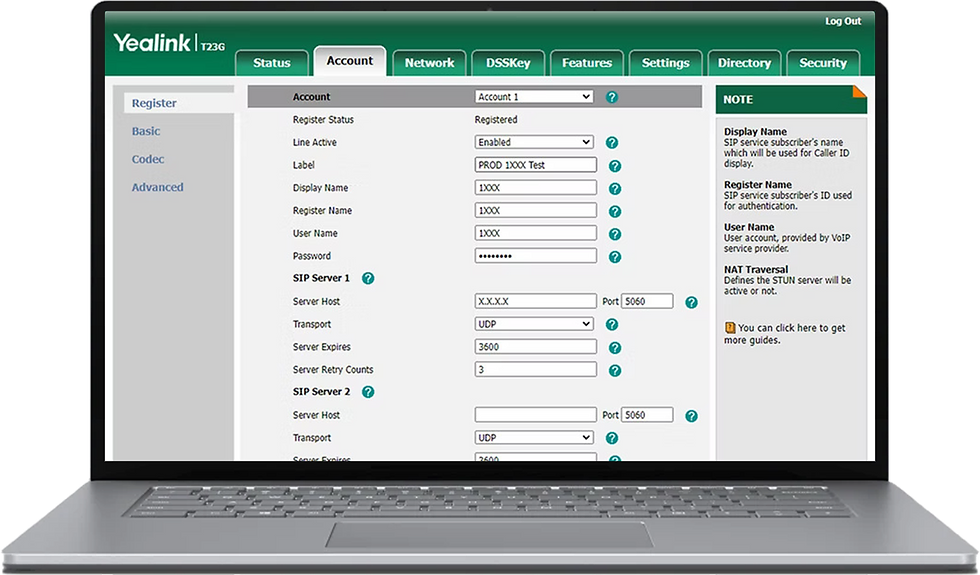
01. The Display Name, Register Name and User Name are the extension number, which you previously configured for your agent in the Switchboard Cloud™ Interface.
02. The Password is the one stored in the ps_auths DB table, for your extension.
03. The Server host is the IP address where your Asterisk® service is installed. In this example we use a local IP address, ideal for the case in which your VoIP phone is connected to your company’s local network, normally via a wired network connection.
Set Up a Soft Phone
You can choose between the different brands of Softphones available on the market. More about how to connect a Soft Phone here