
Call Center Quality Assurance Software Before Churn Spikes
Updated: Oct 13

Most businesses find out they have a call quality problem the hard way: after a client doesn't renew, a patient switches providers, or a review shows up online. By then, the damage is done.
The tricky part? Most churn from bad call experiences is completely silent. No complaint, no feedback form, no warning. Just a customer who quietly moved on.
This guide walks through what bad calls actually look like, why small teams are more exposed than they think, and how call center quality assurance software gives you visibility before the churn shows up in your numbers.
The Churn Autopsy: What Bad Calls Actually Look Like
Let's walk through a real scenario. A patient calls a dental practice on a Tuesday afternoon. Here's what happens, and here's what the practice never finds out.
Real-world scenario: Dental practice
A new patient calls to book an appointment. They hit the IVR menu, press the wrong option, get transferred to billing, then hang up after 90 seconds on hold. They leave a voicemail. Nobody calls back that day. They call again two days later, explain themselves to a different front-desk staff member who has no record of the previous call, and eventually book with a competitor instead.
Nobody on the team knows this happened. There was no angry complaint. But the practice lost a patient and probably their family, because of five specific failure points that compounded quietly.
1. Confusing IVR Routing
The caller navigated the wrong menu option and ended up in the wrong queue. A poorly configured IVR is one of the fastest ways to frustrate a first-time caller. Smart IVR setup exists precisely to prevent this, but only if someone reviews whether it's actually working.
The same issue can affect chiropractic clinics, where patients may call to schedule appointments, reschedule visits, or ask billing questions. A chiropractic answering service with appropriate call routing can help direct these inquiries to the right staff and reduce unnecessary transfers.
2. The Dropped Handoff
The caller was transferred without context. They had to re-explain who they were. That moment, having to repeat yourself, is one of the most common triggers for switching to a competitor.
3. The Unreviewed Voicemail
The caller gave up and left a message. It sat in the voicemail queue. No same-day callback happened. From the patient's perspective, they were ignored.
4. The Repeat Call With No History
When they called back, a different agent answered with no record of the first interaction. No notes, no context, no connection. This is the last call before a customer leaves.
5. No Visibility, No Fix
The most damaging failure: nobody on the team knew this pattern was happening. Without call recordings or call notes, there is nothing to review, nothing to improve, and nothing to catch the next time it happens.
"1 in 3 customers will leave a brand after just one bad experience, and most of them won't tell you why." — PwC Future of Customer Experience |
None of these failures was dramatic. No one was rude. No system crashed. But the cumulative effect was a lost customer, and the team had no way to know it was happening.
What Small Teams Usually Miss Before Churn Shows Up
Silent churn usually starts with small call issues that repeat.
The most common warning signs are:
Voicemails are not returned the same day
Callers transferred without context
Repeat callers explaining the same issue again
IVR menus are sending callers to the wrong place
Calls ending without notes or follow-up
One missed callback may be a busy day. Five missed callbacks in a week are a process problem.
That is where call center quality assurance software helps. It shows patterns that small teams usually miss, so they can fix call issues before customers leave quietly.
Why Small Teams Are More Exposed Than Large Ones
Large contact centers usually have QA managers, reporting tools, and backup staff. Small businesses usually do not.
That makes every missed call, late callback, or poor handoff more expensive.
For a small law firm, dental office, clinic, or home services team, losing only a few callers can affect:
Appointments
New client intake
Referrals
Reviews
Revenue
The biggest risk is not just bad calls. It is not known that they happened.
Without call recordings, voicemail logs, transcripts, and call notes, small teams often discover call quality problems only after a complaint, bad review, or lost customer.
Contact center quality assurance software closes that visibility gap by making calls easier to review, track, and improve before churn shows up in the numbers.
Call Center QA Benchmarks Worth Watching
Here are a few benchmarks and warning signs small teams should keep in mind:
Benchmark or Signal | Why It Matters |
1 in 3 consumers may leave a brand they love after one bad experience | Bad experiences do not need to happen repeatedly before they affect retention. |
Acquiring a new customer can cost 5 to 7 times more than retaining an existing one | Losing a caller is not just a service issue. It creates a replacement-cost problem. |
Manual QA often reviews only a small fraction of the total calls | If the team only reviews calls after complaints, most issues stay invisible. |
Repeat calls, missed callbacks, long holds, and wrong transfers are early churn signals | These problems often appear before the customer formally leaves. |
The takeaway is simple: call quality should not be reviewed only after a complaint. By then, the customer may already be gone.
What Call Center Quality Assurance Software Actually Does
Strip away the enterprise jargon, and here's what call center QA software gives you at its core: a systematic way to know what's happening on your calls, before a customer tells you something went wrong.
For an SMB team, the key capabilities to look for are straightforward:
Call Recording
The foundation of any QA process. Every inbound and outbound call is captured automatically and stored for review. Without recordings, there's no record to go back to. Switchboard's call recording feature does this by default; you don't have to turn it on for each call.
Voicemail Logging and Management
Voicemails that get lost or returned late are one of the most common silent churn triggers in service businesses. Call center monitoring software should surface every voicemail in a centralized dashboard so nothing falls through.
Switchboard's voicemail system captures and stores every message, with custom greetings for after-hours calls.
AI Speech-to-Text Transcription
Reviewing 20 call recordings per week is time-consuming. Reading 20 transcripts takes a fraction of the time.
AI-powered transcription converts call audio and voicemails into readable, searchable text, which means a practice manager or office admin can scan for keywords, flag issues, and spot patterns without listening to every recording.
Switchboard's AI call intelligence uses OpenAI Whisper and AWS Transcribe to do exactly this.
Call Records and Notes
When agents document call outcomes, what was discussed and what follow-up was promised, it creates a searchable history per contact.
This is what prevents the "repeat yourself" problem. Call records give the next agent context before they even say hello.
IVR Path Monitoring
Knowing which menu options callers are choosing and where they're dropping off is essential service quality management software functionality.
If 30% of callers are pressing "0" to exit your IVR immediately, that's a configuration problem, not a staffing problem. You can only fix it if you can see it.
Basic VoIP vs Call Center Quality Assurance Software
A basic VoIP phone system can help a business make and receive calls. But call center quality assurance software goes further: it helps the team understand what happened, why it happened, and what needs to change.
Capability | Basic VoIP | Call Center Quality Assurance Software |
Call recording | Sometimes available | Built into the QA review process |
Voicemail tracking | Usually, a basic inbox | Centralized, reviewable, and easier to manage |
AI transcription | Rare or add-on | Searchable transcripts for calls and voicemails |
Call notes/history | Manual or disconnected | Connected to contact-level call records |
IVR visibility | Limited | Shows routing issues and drop-off patterns |
QA reviews | Not designed for review workflows | Supports weekly call review habits |
Churn-risk visibility | Mostly invisible | Easier to spot through repeat calls, missed callbacks, and unresolved issues |
This is the difference between having phone records and having operational visibility.
A basic phone system tells you that a call happened. Call center quality assurance software helps you understand whether the call was handled well enough to keep the customer.
How QA Software Catches Each Failure Point
The five failure points from the scenario earlier aren't random; they map directly to specific QA capabilities. Here's how each one gets caught:
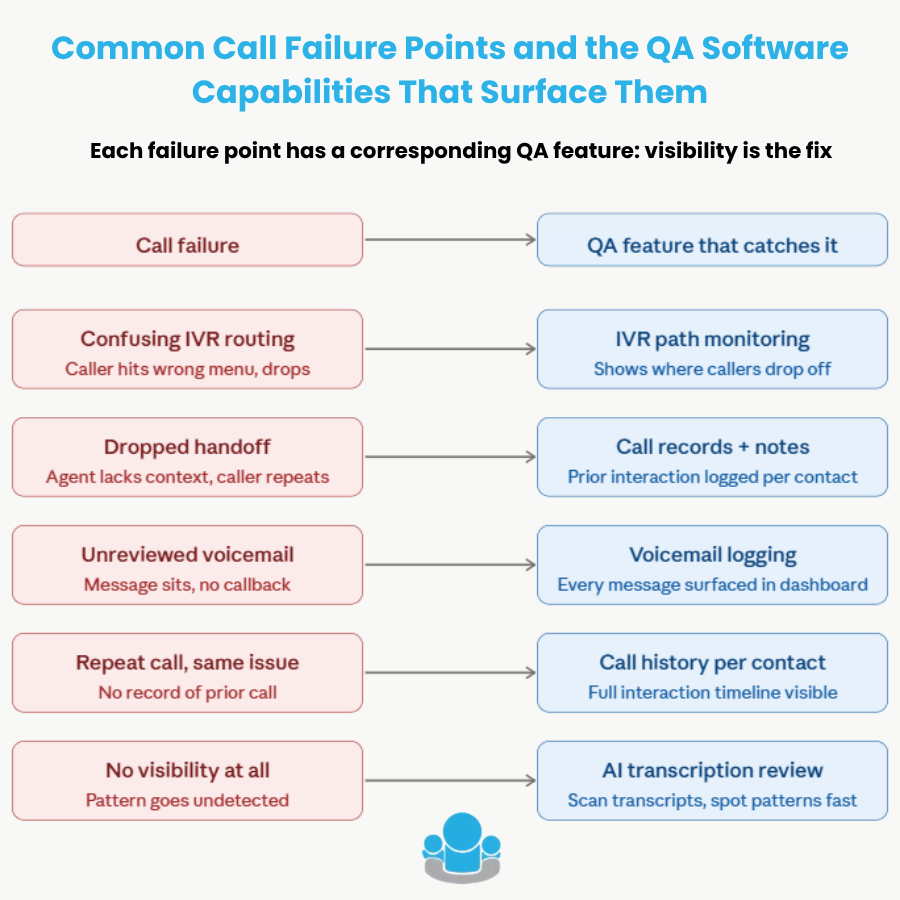
The good news: you don't need a dedicated QA team to use any of these features. You need a phone system that captures the data by default and puts it somewhere you can actually find it.
That's what separates basic VoIP from proper contact-center quality-assurance software.
How to Run a Simple QA Process Without a QA Team
Enterprise QA involves scorecards, evaluation rubrics, dedicated analysts, and weekly calibration sessions.
That's not realistic for a 5–15-person team. But a lighter version of the same discipline, one that takes about 30 minutes a week, is completely achievable.
Set a Weekly Call Review Habit
Pick 5–10 calls per week to review. Use transcripts to scan rather than listen to full recordings.
Look specifically for the five failure patterns above: wrong routing, caller repetition, unreturned voicemails, repeat contacts, unresolved issues.
You can refer to Switchboard's AI call recording guide to build this into a medical or professional services workflow.
Use a Short Checklist, Not a Scorecard
Keep it to five questions:
Did the caller reach the right person?
Was the issue resolved on the first call?
Was there a follow-up promised, and was it logged?
Did the voicemail get returned the same day?
Was the call noted in the system?
That's it. Five questions, reviewed weekly, will surface more than most businesses ever catch.
Track Five QA Metrics Weekly
Small teams do not need a complex QA dashboard to start improving call quality. They need a few metrics that reveal whether callers are getting stuck.
QA Metric | What It Shows | Why It Matters |
First Call Resolution | Whether the issue was solved on the first contact | Low resolution creates repeat calls and frustration |
Average Hold Time | How long do callers wait before reaching someone | Long holds increase abandonment risk |
Callback Completion Rate | Whether voicemails are returned on time | Missed callbacks are a major silent churn trigger |
Transfer Rate | How often do callers move between people or departments | High transfer rates often signal routing or training gaps |
Repeat Caller Rate | How often does the same person call again for the same issue | Repeat calls reveal unresolved problems and missing context |
The goal is not to create a complex reporting system. The goal is to build a habit of spotting patterns before they become lost customers.
Feed Issues Back Into the System Configuration, Not Just Training
Most call quality problems are process and configuration failures, not individual agent failures.
If callers are consistently pressing the wrong IVR option, the menu needs to be rewritten, not just the agent retrained. If repeat callers keep explaining the same issue, the team needs better notes and call history. If voicemails are returned late, the voicemail workflow needs a clear owner.
QA data should inform how your IVR and call queues are set up, not just who gets coaching feedback.
Also worth reading: how IVR manages queues for small teams.
The tools that make this possible, call recording, transcription, centralized voicemail, and call notes, are all standard features in modern call center monitoring software.
The difference is whether your current phone system is surfacing this data in a way you can actually act on, or burying it in a system you never open.
Thirty minutes a week on call QA is one of the highest-ROI activities a small business can run.
Audit Your Last 20 Calls
Before you invest in a full QA process, do one simple exercise: audit your last 20 calls.
Look for these seven signals:
How many callers reached the wrong person or department?
How many calls involved a transfer without context?
How many voicemails were not returned the same day?
How many callers had to repeat information from a previous call?
How many calls had no notes attached afterward?
How many issues were not resolved on the first call?
How many callers contacted you more than once about the same issue?
If more than three of these issues show up in your last 20 calls, you probably do not just have a phone problem.
You have a QA visibility problem.
That means customers may already be giving you warning signs before they leave. The question is whether your current phone system makes those warning signs easy to see.
Switchboard gives small business teams call recording, AI transcription, voicemail logging, call records, and notes in one place, so they can run a real QA process without a dedicated QA department.
The Bottom Line
Come back to the dental patient from the beginning.
She did not complain. She did not write a review. She just booked somewhere else. The practice had no idea it had happened and no way to prevent it from happening again the following week.
Businesses that consistently retain customers in service industries do not always have better staff or lower prices. They often have better visibility into what is happening on their calls.
Call center quality assurance software is the system that closes that gap, giving a small team the same kind of insight that enterprise contact centers pay large QA departments to produce.
You do not need a QA department. You need call recordings, transcripts, voicemail logs, call history, and call notes in one place, plus a 30-minute weekly habit to review them.
That is the difference between finding out about churn after it happens and catching the warning signs before they compound.
Frequently Asked Questions
What's the difference between call recording and call monitoring software?
Call recording captures and stores completed calls for later review. Call monitoring software typically refers to real-time supervision, listening in on live calls or pulling live dashboards. For most small businesses, recorded review is sufficient and far more practical than live monitoring with limited staff.
How many calls should a small team actually review each week?
For a team handling 50–150 calls per week, reviewing 5–10 calls is a realistic and effective starting point. Prioritize calls with long hold times, transfers, repeat contacts, or unreturned voicemails. Transcripts make this much faster than audio review, typically 2–3 minutes per call.
Is call center QA software relevant for industries like healthcare or legal services?
Especially so. Both industries handle sensitive, time-critical calls where missed context or delayed callbacks carry real consequences. Call recordings and transcripts also serve compliance and documentation purposes, an added benefit beyond quality improvement that makes QA software a natural fit for both verticals.
Can I use QA data to improve my IVR setup, not just agent performance?
Yes, and this is often more impactful. If call records show consistent drop-offs at a specific menu option, or frequent transfers to the wrong departments, the fix is IVR reconfiguration, not retraining. QA data should feed directly into how your phone menus and routing logic are structured.
Does using AI transcription raise any compliance concerns for recorded calls?
It depends on your industry and jurisdiction; healthcare, legal, and financial services each have specific requirements around call recording consent and data storage. Platforms like Switchboard let you disable recording for sensitive interactions and use private transcription servers, giving you control over where audio data is processed and retained.


Comments